
No items in cart

Juvo 2 – Troubleshooting Guide
1. Automatic Update to Version 2.6.3 +
Issue: Application update may fail due to
leftover data from a previous version.
Solution:
Go to Settings > Apps > Juvo App
Select Storage
Tap Clear Cache and Clear Data
Re-open the APK
Authorize all permissions
Proceed with the automatic update
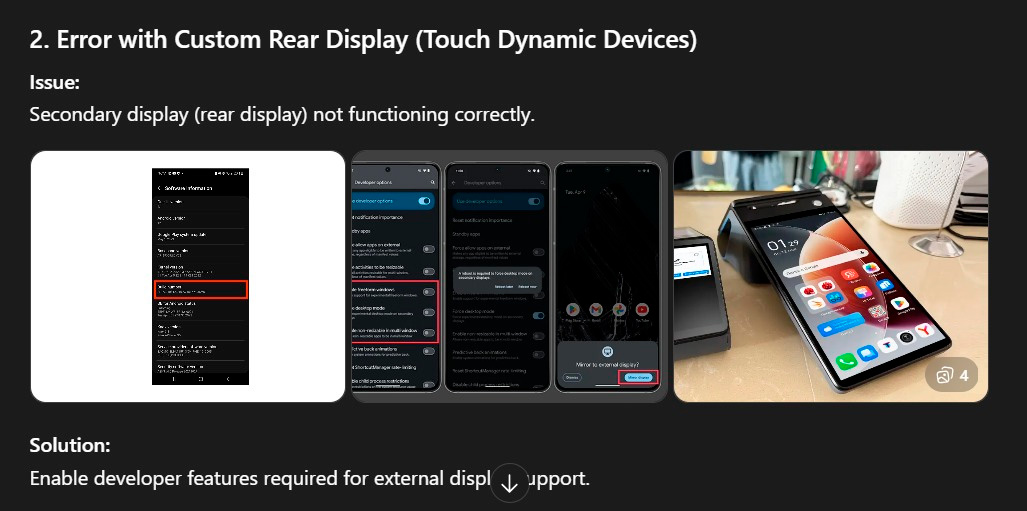
2. Error with Custom Rear Display
Issue: Secondary display not functioning correctly on Touch Dynamic devices.
Solution:
Go to Settings > About Phone
Tap Build Number 7 times to enable
Developer Mode
Go to Settings > Developer Options
Enable 'Force Desktop Mode'
3. Declined Transaction – POSLINK Error
Error: SEND DATA RECV ACL ERROR
Verify IP address in POS
Ensure both devices are on same network
Confirm PAX terminal is powered on
4. PAX POSLink Communication Error
Issue: POS cannot communicate with payment
terminal.
Restart POS and terminal
Verify IP address matches
Check TCP/HTTP configuration
Ensure stable network connection
Use static IP if possible
5. Additional Recommendations
Always document IP configurations
Use static IP addresses to avoid changes
Keep firmware updated on POS and terminal
Test connectivity after every reboot
Ensure proper cabling and Wi-Fi signal
strength
6. Basic Troubleshooting Checklist
Restart all devices
Check power supply
Verify network cables or Wi-Fi
Confirm correct app version installed
Reinstall application if necessary
Check logs for error messages
Touch Dynamic: Configure the Secondary
Display
1. Enable
Developer Options:
Go to Settings > About phone.
Find the Build number and tap it seven times. You will see a message
confirming you are now a developer.
2. Enable
"Force desktop mode":
Go to Settings and find Developer options (it may be under
System).
Scroll down to find the Force desktop mode toggle and turn it on. Some devices may have a similar setting like "Enable desktop experience features".
 "
"

Become a JuvoMOS expert with step-by-step POS and Back Office training. Practical online courses designed to improve operations and efficiency.
Signup Now